Zum Hauptinhalt springen

AssistYu

ASSISTYU VPN

Complete Setup & Support Guide

Your all-in-one resource for installing, activating, and mastering AssistYu VPN on Windows & macOS

Military-grade encryption 50+ server locations Unbegrenzte Bandbreite No-logs policy
OVERVIEW

What is AssistYu VPN?

AssistYu VPN is a premium Virtual Private Network software that creates a secure, encrypted tunnel between your device and the internet. It masks your real IP address, protects your online activities from surveillance, and allows you to browse anonymously without geographical restrictions.

256-bit AES encryption
Automatischer Kill-Switch
DNS leak protection
Split tunneling
KOMPATIBILITÄT

System Requirements

Windows 8, 10, 11
macOS Monterey, Ventura, Sonoma, Sequoia
One license protects 1 or 3 devices depending on your purchased plan
GET LICENSE

Purchase & License Key

After completing your purchase, you'll receive your unique license key via email within minutes

License key sent to your registered email
Check expiration: Click gear icon → "License Information"
Need to cancel? Contact PayPro Global customer support
Purchase AssistYu VPN
INSTALLATION GUIDE

Install on Windows or macOS

Follow these detailed steps for a successful installation on your device

1 Download the .exe installer
2 Run as Administrator
3 Accept UAC prompt
4 Follow wizard → Finish
💡 Tip: If SmartScreen appears, click "More info" then "Run anyway"
1 Download the .dmg file
2 Open DMG → Drag to Applications
3 Launch from Applications folder
4 Allow security override if needed
💡 Tip: If "unidentified developer", go to Privacy & Security → Open Anyway
ACTIVATION

Register & Activate Your License

Two simple steps to unlock all premium features
Step 1
STEP 01

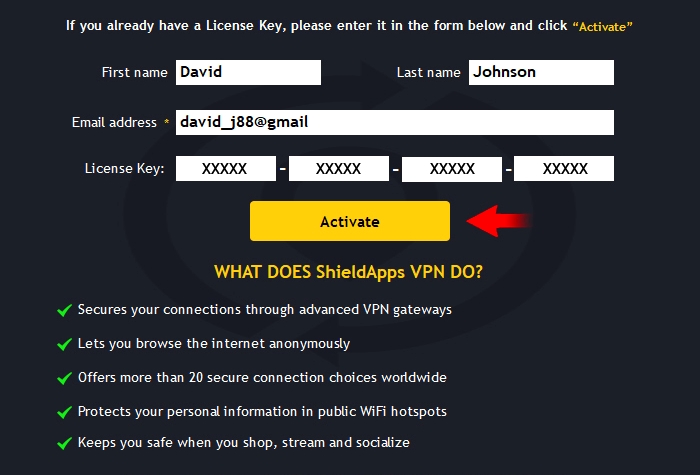
Enter Your Personal Information

Open AssistYu VPN, click the Activation button. Fill in:

  • First name & Last name
  • Email address used for purchase
Email must match your order exactly
Step 2
STEP 02

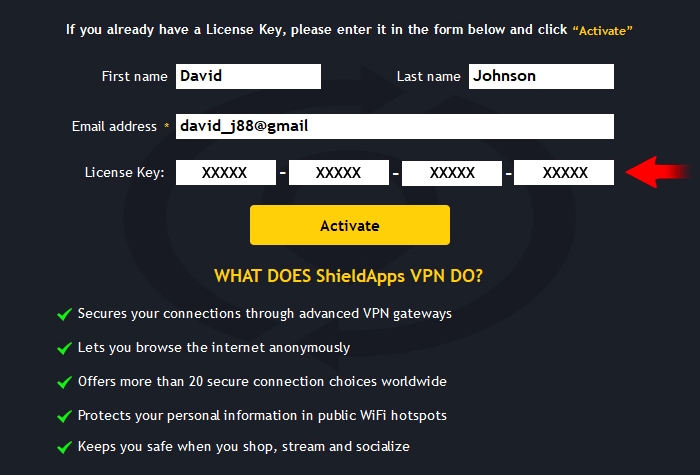
Paste License Key & Activate

Copy your license key (format: XXXXX-XXXXX-XXXXX-XXXXX). Paste it, then click "Activate".

✅ Green confirmation = fully unlocked!
For iOS: license key = password

Activation Troubleshooting

  • Invalid key: Copy exactly without extra spaces
  • Email not recognized: Use the exact email from purchase
  • Still issues? Contact support via banner below
CONNECTING

Connect to a Secure Server

Get protected in seconds with our one-click connection

Launch AssistYu VPN
Select a server location
Click "Connect" button
You're protected! (3-5 sec)
Your real IP is hidden ‱ All traffic encrypted ‱ Browse anonymously
Pro tip: Star your favorite servers for one-click access Use "Fastest Server" for optimal speed
REMOVAL

How to Uninstall AssistYu VPN

Complete removal guide for Windows and macOS

Windows 10 / 11

  1. Settings → Apps → Installed apps
  2. Find "AssistYu VPN" → Uninstall
  3. Follow wizard → Restart PC
Alternative: Control Panel → Programs and Features

macOS

  1. Finder → Applications folder
  2. Right-click AssistYu VPN → Move to Bin
  3. Empty Bin to complete removal
Reinstall anytime using the same license key
ARCHIVE

Previous Versions

Legacy installers for older operating systems

v2.1.8Windows 8 / 8.1 / 7 SP1Download .exe
v2.0.5Windows 32-bit systemsDownload .exe
v1.9.4macOS Big Sur / CatalinaDownload .dmg
v1.8.2macOS Mojave / High SierraDownload .dmg
Older versions receive limited updates. Use latest version for optimal security.
KNOWLEDGE BASE

HĂ€ufig gestellte Fragen

What is AssistYu VPN?
AssistYu VPN creates an encrypted tunnel between your device and the internet, hiding your IP address and protecting your privacy online using AES-256 encryption.
How many devices can I protect?
Standard license: 1 device. Premium license: up to 3 devices simultaneously.
Activation fails?
Ensure correct email and license key format, check internet connection, then retry. Contact support if persists.
How do I cancel my subscription?
Go to PayPro Global customer support, fill in your order details, and submit a cancellation request. 30-day money-back guarantee available.
Still need help? Our support team is available 24/7 to assist you